This chapter describes how Magento manages e-mails, how you can edit e-mail content, set e-mails from and to parameters, etc. Magento has built-in functionality called Sales Emails which manages the e-mails sent to customers when the order is processed.
The following steps describe how to set up order e-mails in Magento −
Step (1) − Login to your Magento Admin Panel.
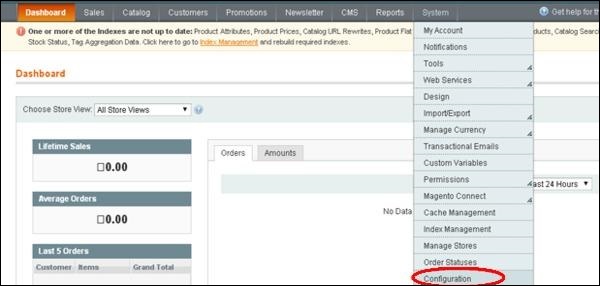
Step (2) − Go to the System menu and click on Configuration option.
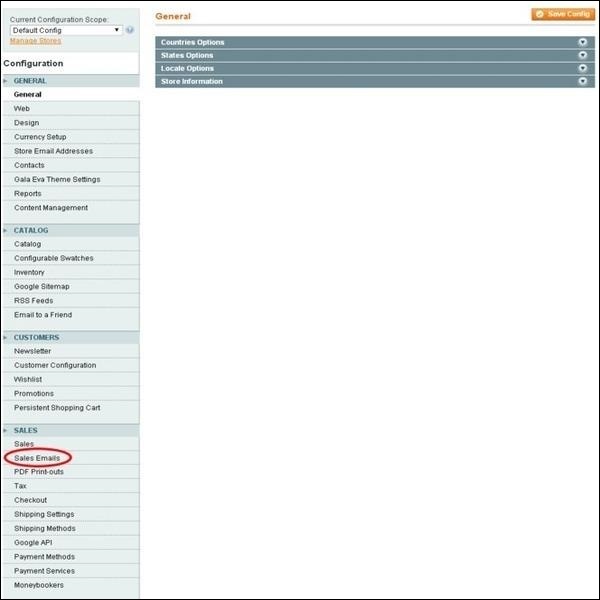
Step (3) − On the left side of the navigation bar, go to Sales section and click on the Sales Emails option.
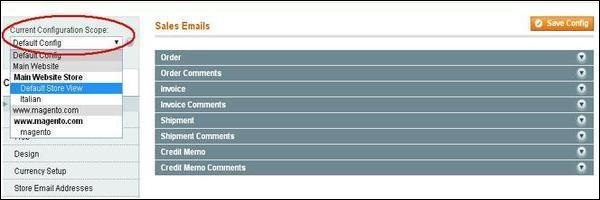
Step (4) − Select the scope under Current Configuration Scope for which you want this configuration to apply.
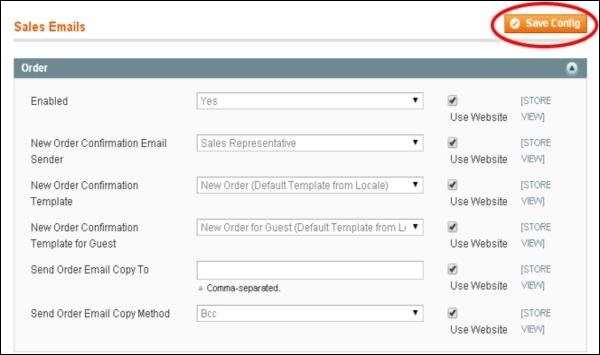
Step (5) − Under Sales Emails page, expand the Order panel which contains the following settings.
-
Enabled − Set this option to Yes to enable new order confirmation e-mails to be sent.
-
New Order Confirmation Email Sender − Using this field, select the e-mail address which is to be used for sending new order confirmation.
-
New Order Confirmation Template − It selects the template which is to be used for the order confirmation e-mails, sent to the registered customers.
-
New Order Confirmation Template for Guest − It selects the template which is to be used for the order confirmation e-mails, sent to the guest customers.
-
Send Order Email Copy To − It specifies the e-mail address to which copy of the new order confirmation e-mail is sent.
-
Send Order Email Copy Method − You can send copy of the new order confirmation e-mail to the additional e-mail address using BCC or separate e-mail.
Step (6) − After done with the settings, click on the Save Config button to save your changes.