Magento - Setup Categories


Categories are classes or things which are related, and have some shared characteristics. The following steps describe how to add categories for the products in Magento.

Step (1) − Login to your Magento Admin Panel.

Step (2) − Go to the Catalog menu and click on the Manage Categoriesoption.
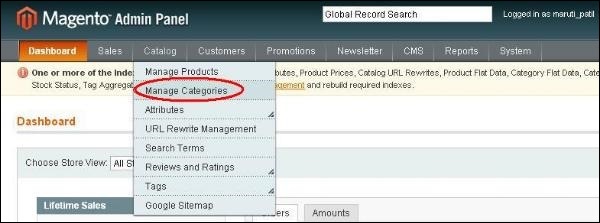
Magento Setup Categories

Step (3) − Next you need to fill the fields like Name of the category, Is Active status which is set to Yes/No and Description of the category.
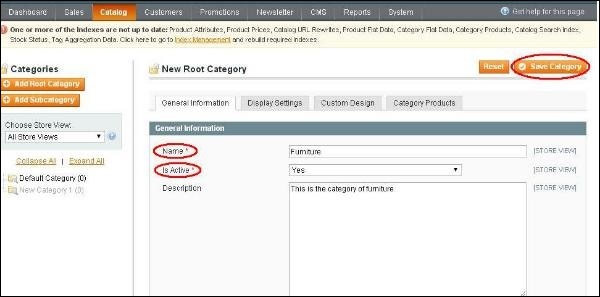
Magento Setup Categories

Step (4) − Click on Save Category button and your category is ready to have the products added to it.


Did you find this article useful?


  • Magento - Product Overview

    Magento Products Products are the items or things that are sold in Magento. Product can be anything that is capable of satisfying the customer’s need...

  • Magento - Setup Products

    Products are the items or things that are sold in Magento. You can add your products to the store view as per customers’ needs. It includes both physi...

  • Magento - Setup Taxes

    Magento allows to set up different tax classes and tax rates, and bringing them together into tax rules. You can also define product tax classes and a...

  • Magento - Setup Shipping Rates

    In online business, selling of physical products to customers should have flexible and scalable shipping policies. Magento is a friendly system for bu...

  • Magento - Setup Currencies

    Magento has built-in functionality for currencies. After installing Magento, by default there will be one currency used for pricing and payment. The ...